

Typecho具有非常简洁的后台管理界面,自带Markdown编辑器,让写作变得更加简单,作为许多程序员建站的首选,Typecho可谓深受程序员的青睐,另外许多个人博客站长也非常喜欢使用Typecho进行创作。虽然Typecho向来以简洁出名,但其官方的开发文档也是简单到爆,几乎没有过多的说明,以至于许多开发者都是在摸索中前进。Typecho的文章分类页面标题、关键词、描述主要是以分类名称作为页面标题和关键词,分类描述作为网页描述标签内容。这种设置对于百度等搜索引擎非常不友好,对于网站优化人员而言,有时需要对文章分类进行优化,从而使之得到良好的排名,如果仅仅是官方的文章分类设置,无法进行更好的优化工作。因此,需要对Typecho的文章分类进行自定义标题、关键词及描述,遗憾的是安阳seo找遍所有方法均没有实质性的解决方法,于是决定二开Typecho来实现自定义设置文章分类的标题、关键词及描述。
第一步,首先查找用于控制分类设置页面的文件,该文件位于var->Widget->Metas->Category->Edit.php,打开此文件找到
/** 取出数据 */
$category = $this->request->from('name', 'slug', 'description', 'parent');
$category['slug'] = Common::slugName(empty($category['slug']) ? $category['name'] : $category['slug']);
$category['type'] = 'category';
$category['order'] = $this->getMaxOrder('category', $category['parent']) + 1;
替换为
$category = $this->request->from('name', 'seoname', 'seocatkeywords', 'slug', 'description', 'parent');
$category['slug'] = Common::slugName(empty($category['slug']) ? $category['name'] : $category['slug']);
$category['type'] = 'category';
$category['order'] = $this->getMaxOrder('category', $category['parent']) + 1;
眼尖的人可以发现增加了seoname和seocatkeywords,这两个一个代表分类seo标题,另一个代表seo分类关键词
接下来我们再找到
/** 分类名称 */
$name = new FormElementText('name', null, null, _t('分类名称') . ' *');
$form->addInput($name);
在其下方添加
/** SEO分类名称 */
$seoname = new FormElementText('seoname', null, null, _t('SEO分类名称') . ' *');
$form->addInput($seoname);

/** SEO分类关键词 */
$seocatkeywords = new FormElementText('seocatkeywords', null, null, _t('SEO分类关键词') . ' *');
$form->addInput($seocatkeywords);
找到
if (!$meta) {
                $this->response->redirect(Common::url('manage-categories.php', $this->options->adminUrl));
            }
            $name->value($meta['name']);
            $slug->value($meta['slug']);
            $parent->value($meta['parent']);
            $description->value($meta['description']);
            $do->value('update');
            $mid->value($meta['mid']);
            $submit->value(_t('编辑分类'));
            $_action = 'update';
        } else {
            $do->value('insert');
            $submit->value(_t('增加分类'));
            $_action = 'insert';
        }
替换为
if (!$meta) {
                $this->response->redirect(Common::url('manage-categories.php', $this->options->adminUrl));
            }
            $name->value($meta['name']);
        $seoname->value($meta['seoname']);
        $seocatkeywords->value($meta['seocatkeywords']);
            $slug->value($meta['slug']);
            $parent->value($meta['parent']);
            $description->value($meta['description']);
            $do->value('update');
            $mid->value($meta['mid']);
            $submit->value(_t('编辑分类'));
            $_action = 'update';
        } else {
            $do->value('insert');
            $submit->value(_t('增加分类'));
            $_action = 'insert';
        }
找到
/** 取出数据 */
        $category = $this->request->from('name', 'slug', 'description', 'parent');
        $category['mid'] = $this->request->mid;
        $category['slug'] = Common::slugName(empty($category['slug']) ? $category['name'] : $category['slug']);
        $category['type'] = 'category';
        $current = $this->db->fetchRow($this->select()->where('mid = ?', $category['mid']));

        if ($current['parent'] != $category['parent']) {
            $parent = $this->db->fetchRow($this->select()->where('mid = ?', $category['parent']));

            if ($parent['mid'] == $category['mid']) {
                $category['order'] = $parent['order'];
                $this->update([
                    'parent' => $current['parent'],
                    'order'  => $current['order']
                ], $this->db->sql()->where('mid = ?', $parent['mid']));
            } else {
                $category['order'] = $this->getMaxOrder('category', $category['parent']) + 1;
            }
        }
替换为
/** 取出数据 */
        $category = $this->request->from('name', 'seoname', 'seocatkeywords', 'slug', 'description', 'parent');
        $category['mid'] = $this->request->mid;
        $category['slug'] = Common::slugName(empty($category['slug']) ? $category['name'] : $category['slug']);
        $category['type'] = 'category';
        $current = $this->db->fetchRow($this->select()->where('mid = ?', $category['mid']));

        if ($current['parent'] != $category['parent']) {
            $parent = $this->db->fetchRow($this->select()->where('mid = ?', $category['parent']));

            if ($parent['mid'] == $category['mid']) {
                $category['order'] = $parent['order'];
                $this->update([
                    'parent' => $current['parent'],
                    'order'  => $current['order']
                ], $this->db->sql()->where('mid = ?', $parent['mid']));
            } else {
                $category['order'] = $this->getMaxOrder('category', $category['parent']) + 1;
            }
        }
改好后进行保存并替换掉该文件。
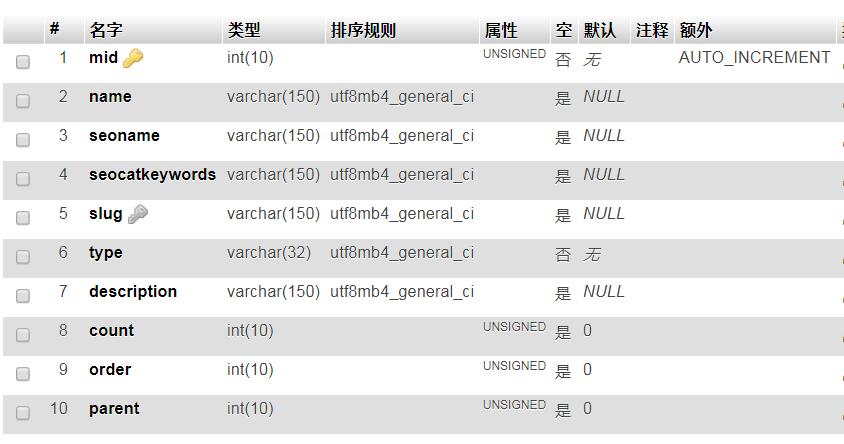
第二步、修改数据库,使用PHPMyadmin打开对应的数据库,点击typecho_metas表,并切换为结构,在字段name后添加两个字段分别为seoname和seocatkeywords设置类型选择VARCHAR、长度150(根据需求自己设置)、默认选择NULL、排序规则选择utf8mb4_general_ci、属性留空、勾选空复选框和调整权限复选框之后点击保存,最后的样子应该是这样
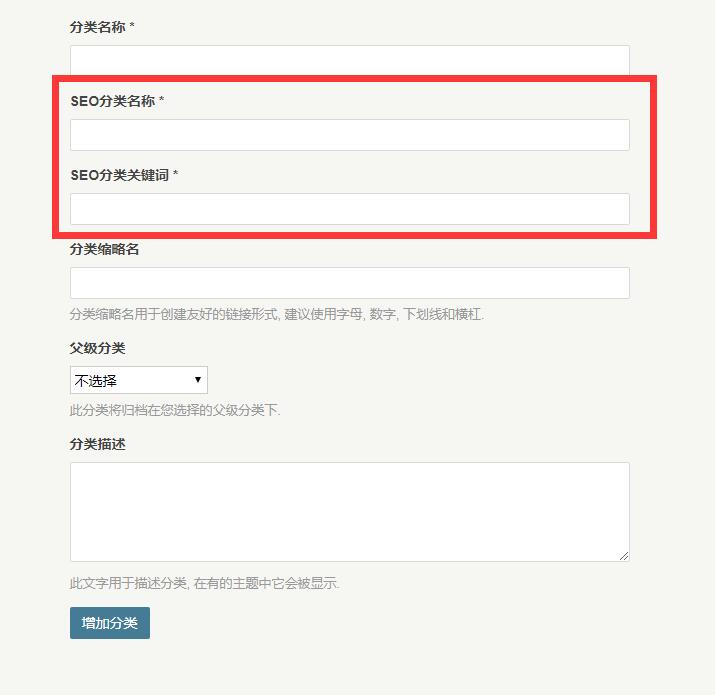
下面我们一起来测试下成果吧,新建分类你会发现相比之前的表单,增加了 SEO分类标题和SEO分类关键词输入框
当填写好SEO分类标题和SEO分类关键词后,我们来测试下前台的显示结果,可以看到Typecho自定义设置文章分类的标题、关键词及描述的效果已经实现,开心的去优化网站分类吧。
解释说明:
判断页面
<?php if($this->is('index')): ?>
是首页 显示 内容
<?php else: ?>
不是首页显示 内容
<?php endif; ?>
嵌套使用
<?php if($this->is('index')): ?>
是首页 显示 内容
<?php else: ?>
<?php if($this->is('category')): ?>
是文章分类显示内容
<?php else: ?>
不是首页和分类显示内容
<?php endif; ?>
<?php endif; ?>
各页面判断
/*
判断各个页面,可判断当前页面是否为首页、分类、文章、页面当是的时候显示内容 当不是的时候显示另外的内容
index 首页
article 判断文章归档页
category 判断分类页
tag 判断标签页
date 判断时间页
single 判断内容页
post 判断内容页
page 判断独立页面
attachment 是否为附件
*/